Heads up: I may earn from links in this post. It never changes the verdict.
You Don’t Need More Practice. You Need to Stop Forgetting.
You don’t need more practice. You need to stop forgetting.
Ever nailed a riff after a week of practice, then come back a month later and completely butchered it?
It’s not just you. It’s how our brains are wired.
I have notebooks full of exercises, riffs and songs I’ve learned. Every time I write something down, I tell myself, “I’ll definitely review this regularly.”
Let’s be honest: that rarely happens.
Those notebooks just become archives of things I used to know.
After losing too many riffs to the void, I built a simple system that fixed it. This isn’t another practice routine. It’s a way to stop losing what you’ve already learned.
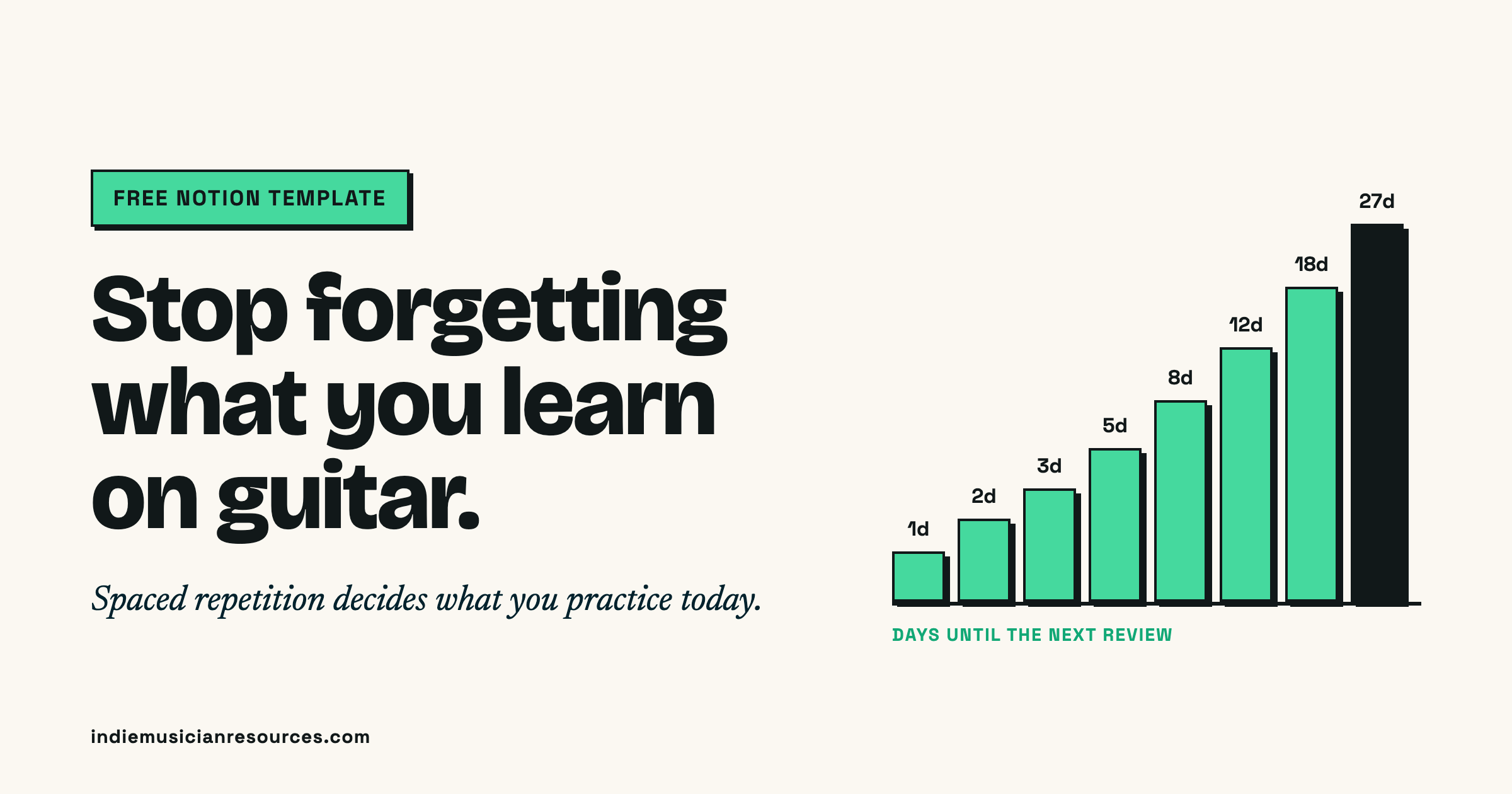
The fix is spaced repetition: you review each riff, song or scale just before you’d forget it, at gaps that grow as you get it down. It’s how language learners hold onto thousands of words. I use it for guitar with a free guitar practice tracker in a Notion template that builds my practice list every day. Play something, click Good or Again, and the template decides when you see it next.
Below: why you forget, how the spacing works, and a step-by-step setup. The template is free at the end.
The problem isn’t practice, it’s forgetting
The usual advice for guitar players is practice more, or copy someone else’s routine.
But more practice doesn’t help if everything you practiced last month is already gone.
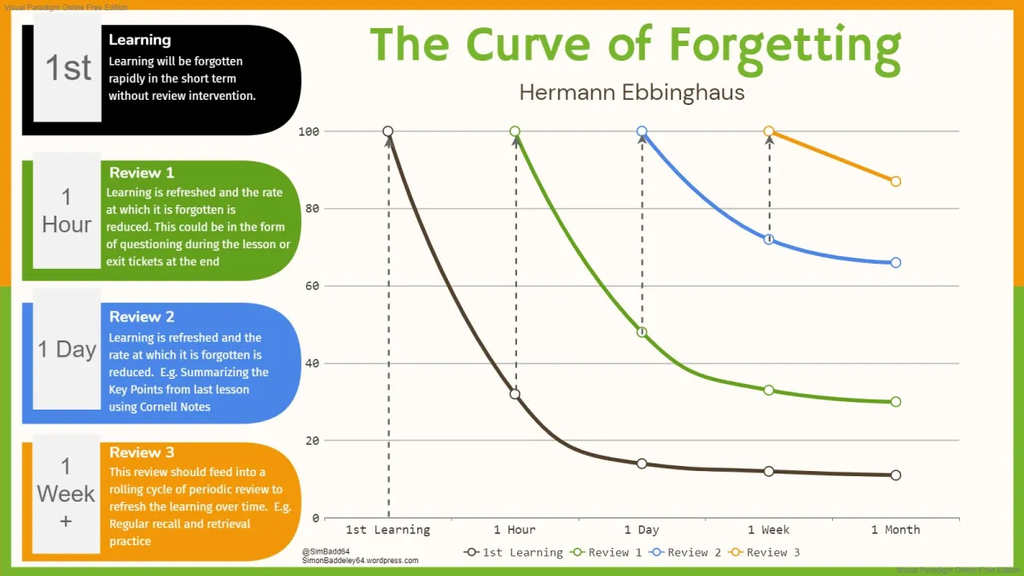
Your brain starts forgetting almost immediately
Your brain starts forgetting almost immediately
In the 1880s, psychologist Hermann Ebbinghaus tested how fast he forgot lists he’d memorized. After one hour, relearning a list saved him only about 44% of the original effort. By the next day it was about 34%. Roughly half to two-thirds of the work was gone. A 2015 replication got almost the same curve.
This isn’t a beginner problem
Kirk Hammett of Metallica has admitted he had to relearn his own solos.
One of metal’s most iconic guitarists forgot how to play his own music. If it can happen to him, it can happen to any of us.
How I found the fix (by accident)
I discovered the solution while learning Korean.
I was using a technique called spaced repetition to remember vocabulary and grammar, and I thought it could work for guitar too.
There were plenty of spaced repetition apps for languages. I couldn’t find anything that really worked for guitar practice.
So I built my own in Notion.
How spaced repetition works for guitar
Instead of practicing something over and over until you think you’ve got it, and then never touching it again, you review it at gradually increasing intervals.
Learn a new riff today and, as long as you keep playing it cleanly, you’d review it:
- Tomorrow
- Two days later
- Three days later
- Five days later
- Then 8, 12, 18, 27 days… out to a maximum of two months
Each time you play it cleanly, the gap before the next review grows by half. Fumble it, and the gap gets cut in half so it comes back sooner.
Why it works: every time you review something just as you’re about to forget it, the memory gets stronger. It’s like your brain goes, “Oh, this must be important. I’d better hold onto it.”
The hard part is keeping track of all those intervals across dozens of songs and riffs.
That’s the whole job of the system.
What’s inside the template
There are only three pieces:
- Guitar Knowledge: one table with everything you’re learning. Each item has an Area (Scales, Repertoire, Licks, Warm-Up…), a Status, a target BPM, and two buttons: 🟢 Good and 🔴 Again.
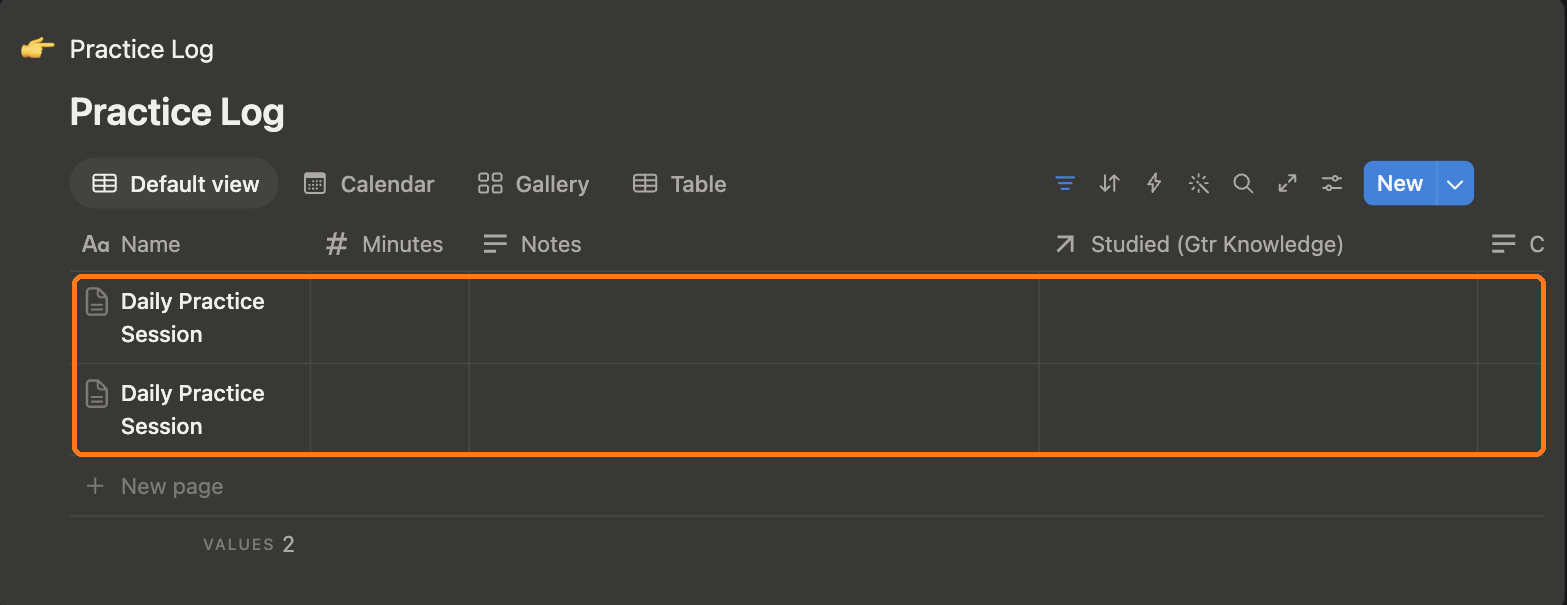
- Practice Log: one page per practice session.
- Daily Practice Session: a page template that pulls in only what’s due today, most overdue first.
You never scroll through 40 items deciding what to work on. You open today’s session and the list is already built.
The system: 3 steps
Step 1: Capture everything in one place
Everything I learn goes into one master database, whether it’s a full song, a cool riff, a scale, a chord progression or a lesson from a course I’m taking.
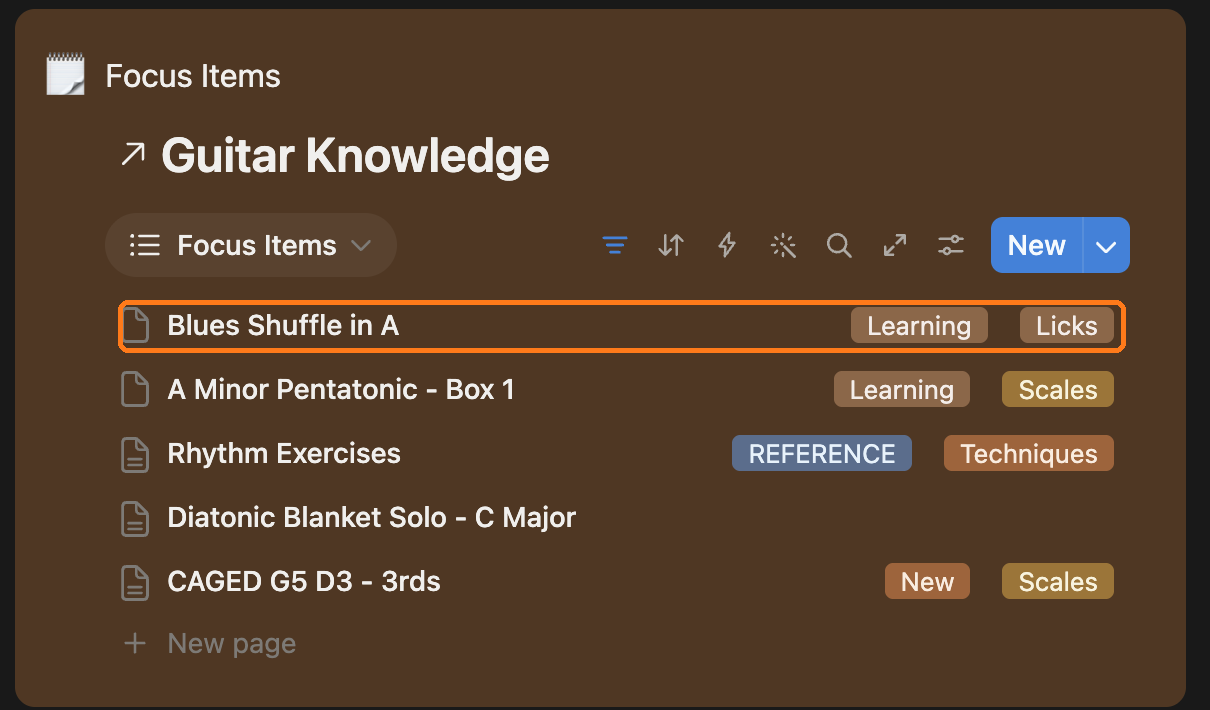
Adding something takes about 30 seconds. Click New in the Guitar Knowledge table:

Give it a name, then pick an Area. The Area decides which section of your practice session it shows up in.

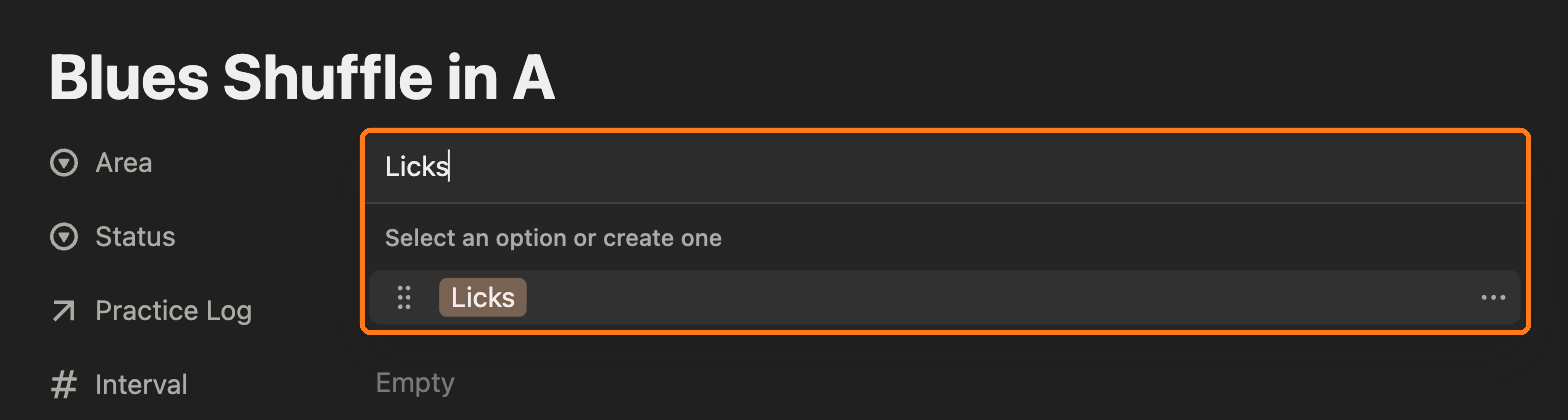
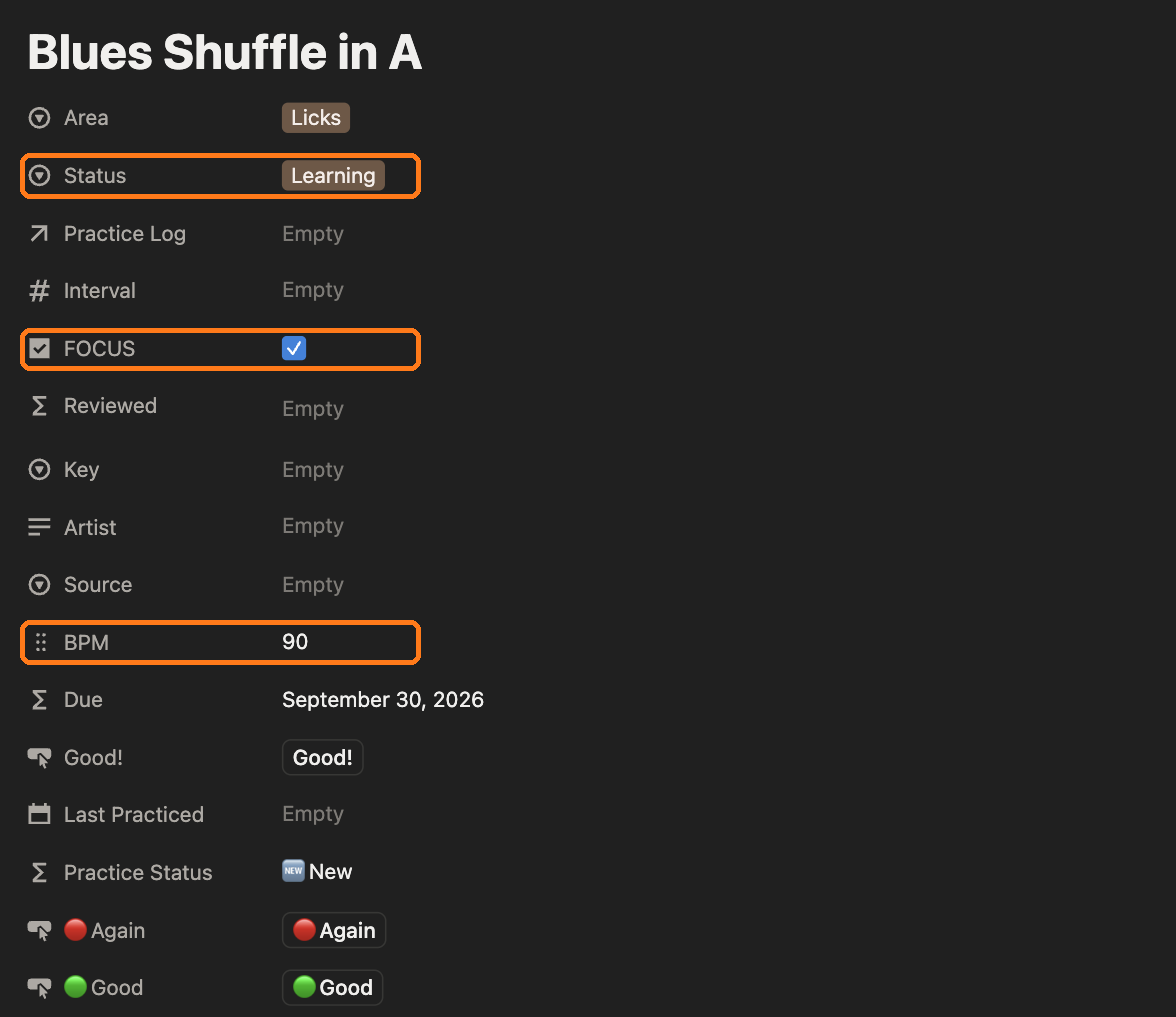
Set a Status, tick FOCUS if it’s one of the 3–5 things you’re drilling right now, and add a target BPM, the tempo you’re working toward, not where you are today.
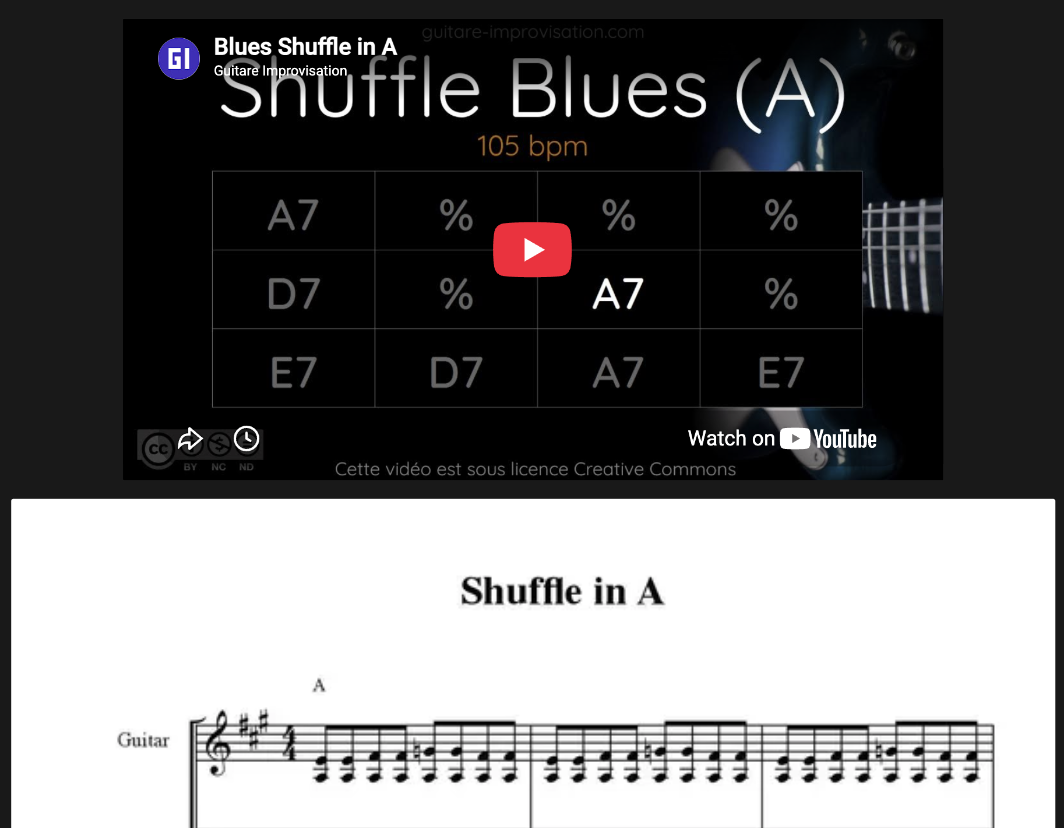
Learning a new song? Everything related to it goes into one item: the lesson link, the official track for reference and the tabs. Paste a YouTube link and choose Embed, or drag in a PDF or image of the tab. When it’s time to review, everything’s in one place.
Just learned a riff? It goes straight in as a new item. I record a quick video of myself playing it correctly so I have a reference later.
Taking an online course? For my Pickup Music lessons, I keep everything together: the lesson content, the jam tracks and screenshots of key techniques.
I spent six months on Pickup Music. Here’s my full Pickup Music review.
The new item shows up in the master database, and in your Focus list if you ticked FOCUS:

Step 2: Rate it, and let the system do the scheduling
Every item has two buttons: 🟢 Good and 🔴 Again. After you play something, you click one.
My rule for which one to click:
- 🟢 Good: I played it clean at my target tempo.
- 🔴 Again: it fell apart, or I had to slow way down.
Behind the scenes, each item has an Interval, the number of days until you see it again:
| You click | What happens to the interval |
|---|---|
| 🟢 Good | Grows by half (×1.5), up to a 60-day max |
| 🔴 Again | Gets cut in half, never below 1 day |
Play something cleanly ten times in a row and it goes 1 → 2 → 3 → 5 → 8 → 12 → 18 → 27 → 41 → 60 days apart. That’s about four months of clean playing before it settles into a once-every-two-months check-in.
Why Again halves instead of starting over. If you fumble a song you’ve played for two months, you haven’t forgotten it. It’s rusty. Sending it back to day one would flood your list with stuff you mostly know. Halving brings it back sooner without pretending you’re starting from scratch. A song at an 18-day interval drops to 9. Play it clean next time and it climbs back to 14.
Why there’s a 60-day cap. Without one, a song you know well would drift out to six months, then a year, and you’d find out on stage that it’s gone.
Each item also shows where it stands at a glance:
- 🆕 New: you haven’t practiced it yet
- ⚠️ Due today / 🔥 Overdue: it’s time
- ✅ Done today: you already rated it today
- 🟢 Next in 5d: not due yet
- ⏸ Paused: parked. It drops out of every list until you bring it back
- 📚 Reference: things you want to keep but never drill, like a chord chart
You don’t need to touch these. They’re already in the template. 🟢 Good sets Last Practiced to today, and sets Interval to:
if(empty(This page.Interval), 1, min(60, round(This page.Interval * 1.5)))🔴 Again sets Last Practiced to today, and sets Interval to:
if(empty(This page.Interval), 1, max(1, round(This page.Interval / 2)))Due is Last Practiced + Interval:
dateAdd(prop("Last Practiced"), prop("Interval"), "days")To change the pace, change the 1.5. Anything from 1.5 to 1.8 works with this formula. At 1.8 the gaps go 1, 2, 4, 7, 13, 23, 41, 60, which means fewer reviews but faster fading. Below 1.5, rounding keeps new items stuck at one day. In Notion’s button editor, “This page” has to be picked from the dropdown as a chip. Typed as plain text, it gives an “Unknown value” error.
Step 3: Practice what’s due, then rate it
This is where it gets powerful. When I sit down to practice:
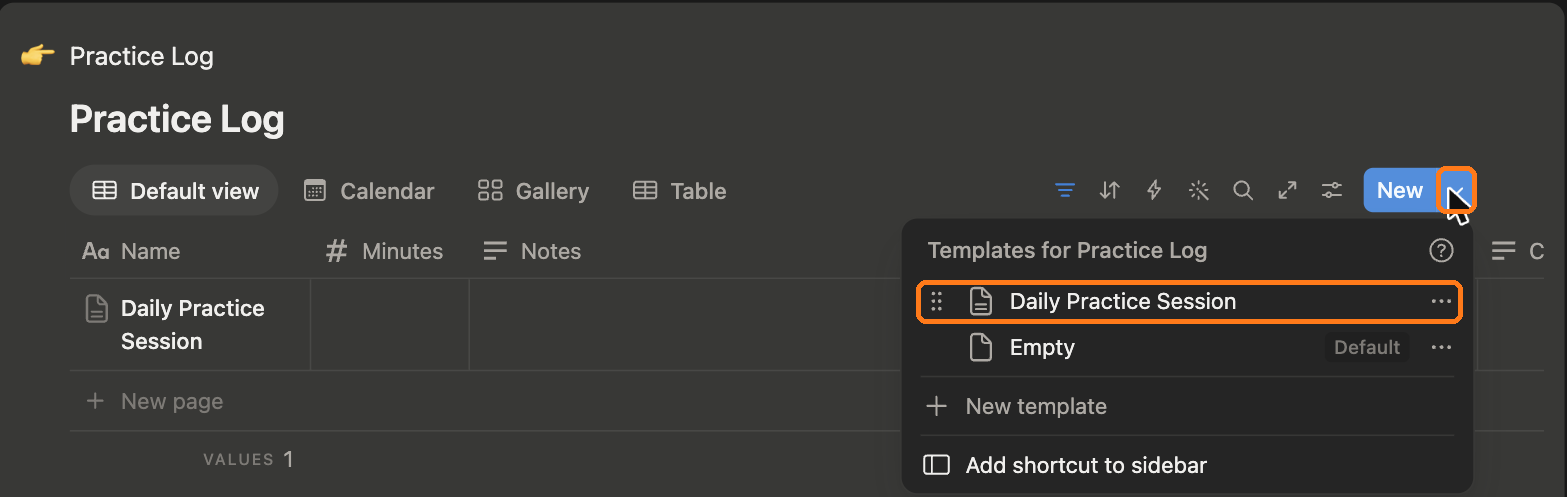
1. Open the practice template. In the Practice Log, click the arrow next to New → Daily Practice Session. (Tip: set it as the default and it’s one click.)

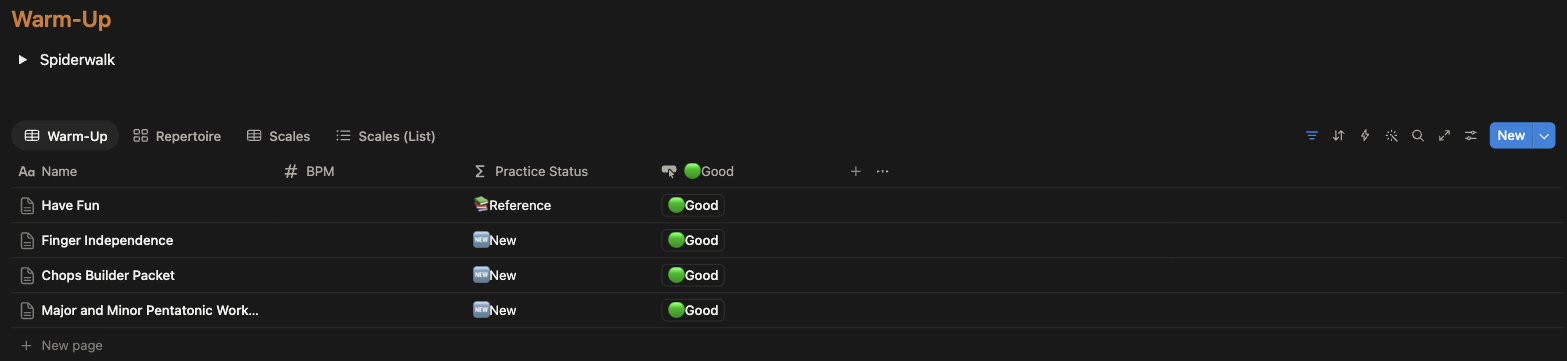
2. Warm up. Warm-ups sit at the top of every session.
3. See exactly what needs review today. Only items that are due show up, most overdue first.
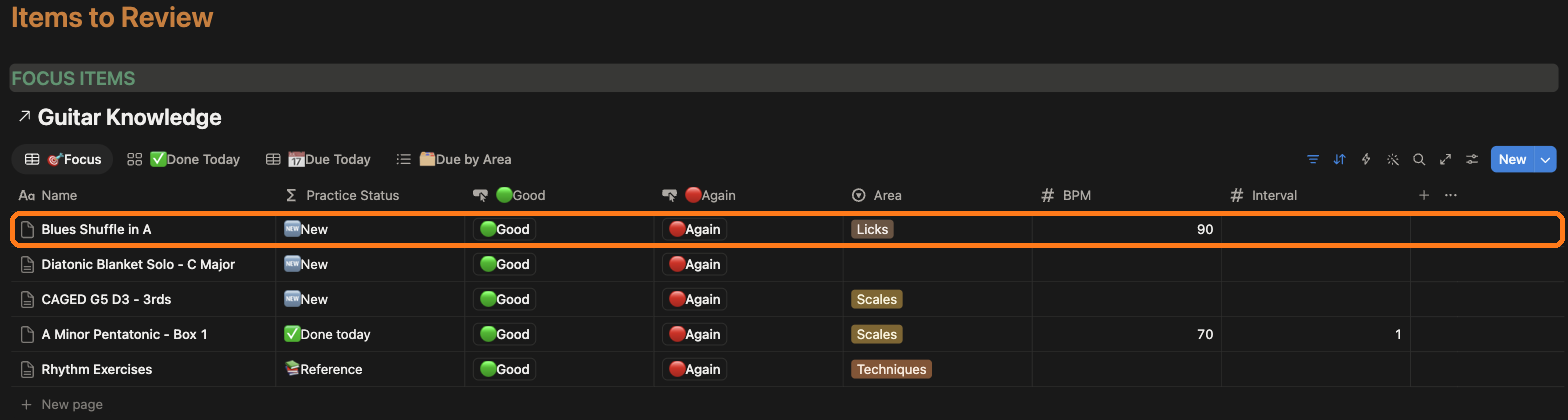
4. Practice each item, then click Good or Again.
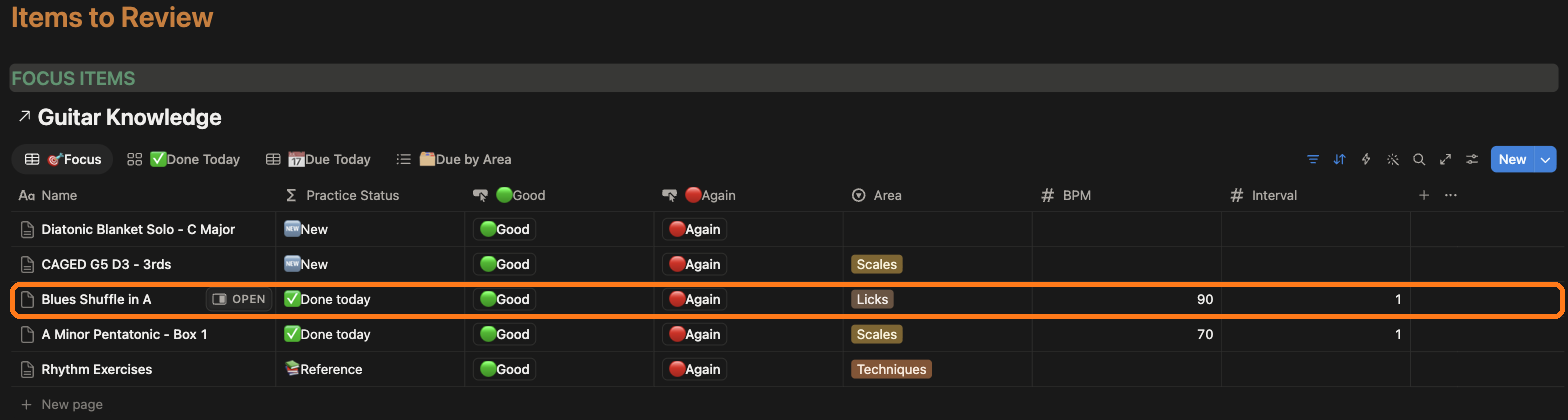
5. It drops off today’s list and moves to Done Today. It’ll come back when it’s due.
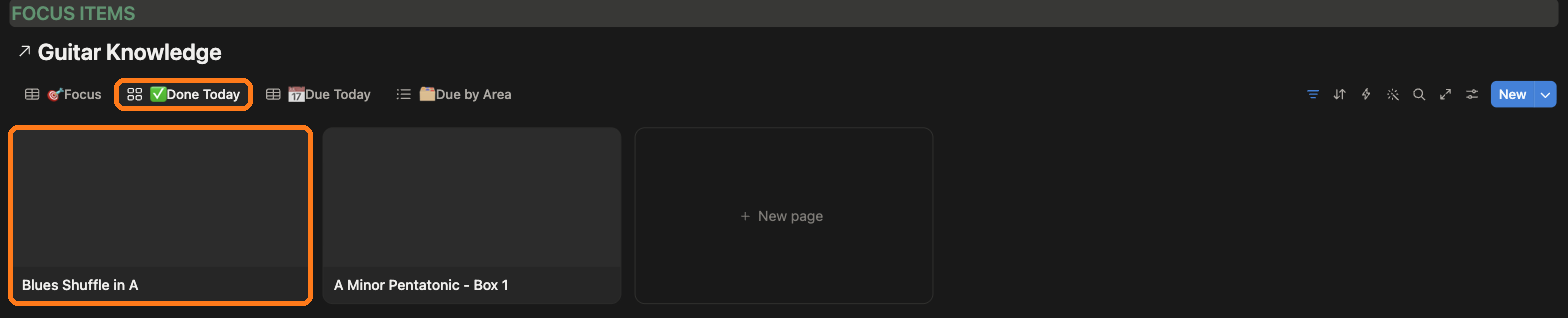
The system records when you last reviewed each item, so it knows when to show it again.
No more guessing. No more flipping through notebooks.
Every session is saved, so over time the Practice Log becomes a record of every day you actually picked up the guitar.
Start small
- Don’t add 40 items on day one. Everything starts as New, so your first session would list all of them. Add five or six, and add more as those settle into longer gaps.
- Keep FOCUS small. Three to five items. FOCUS is “what am I actually trying to get better at this month”, not “everything I like”
- Pause freely. Lost interest in a song? Set it to Paused instead of deleting it.
Does it actually work?
I tend to really focus on 1 thing for a long time when I’m actively learning a song or a solo, but after that I always had a tendency to never review it again because I would focus on the next thing. However with this system, I am now have a way to review all the things I previously learned without the friction of having to decide or go through pages of notes in a notebook to find what I need to review.
The system grows with you. Every new thing you learn gets tracked and reviewed at the right time to lock it into your memory.
The Bottom Line
Riffs you’ve already learned fall apart because you forget them, not because you didn’t practice enough. Spaced repetition fixes that by bringing each song back right before it fades, and it keeps what you’ve nailed from eating your practice time.
You don’t need an app or a subscription for this. A free Notion account and the template below will do it.
Get the free Notion guitar practice tracker template
It’s a copy of the exact system from this post:
- Example items so you can see how it works
- The Guitar Knowledge database
- The Practice Log and Daily Practice Session template
- One-click Good / Again buttons with the spacing already built in
Get the free Notion template
The spaced repetition system from this post, ready to copy into your Notion. Add what you're learning, click Good or Again, and it tells you what to practice each day.
Free. Unsubscribe in one click. You'll also get my guitar newsletter.
Start with the one riff you keep losing. Add it, play it, click a button. Then add five more, not forty.
If you try it, tell me how the 1.5× pace feels after a few weeks. That’s the one number worth tuning.
And if you’re deciding whether a paid course is worth feeding into it, here’s my 6-month Pickup Music review.
Get the good stuff, skip the hype.
One email a month: what's actually worth your money and what isn't. No sponsored picks, no filler.
Unsubscribe in one click.